

Introduction
Managing your health can feel overwhelming, especially when you’re also dealing with depression or another chronic condition. Between scheduling appointments, keeping track of medications, and trying to message your doctor, things can slip through the cracks. That’s where the MGH patient portal comes in.
The official name is Mass General Brigham Patient Gateway. It’s a secure online tool that connects you directly to your care team at Massachusetts General Hospital and across the entire Mass General Brigham system. With the portal, you can schedule appointments, meet for virtual visits, pay your bill, and more from your computer or phone. No more playing phone tag or waiting on hold.
For people managing mental health challenges, this kind of access makes a real difference.

You can request prescription renewals without a call, view test results as soon as they’re ready, and send a private message to your provider when a symptom flares up or you have a quick question. The portal works like a bridge between you and the support you need.
In 2026, digital tools like this are more important than ever. Research shows that patient portals can improve engagement and satisfaction with care. But only if you know how to use them well.
That’s exactly what this guide covers. We’ll walk through the full registration process, explore all the helpful features, and share practical tips for getting the most out of your MGH patient portal for both physical and mental health. If you’re also interested in how other portals work for depression care, check out our guide on managing depression with the UPMC patient portal for a helpful comparison.
Let’s get started.
What Is the MGH Patient Portal?
So, what exactly is the MGH patient portal? Let’s break it down.
The official name is the Mass General Brigham Patient Gateway. It is a free and secure online platform. Think of it as your digital front door to Massachusetts General Hospital and all the other hospitals in the Mass General Brigham system.
The technology behind it is powered by a system called Epic. Many large health networks use Epic’s MyChart software. This means your information flows smoothly between different doctors and facilities. If you see a specialist at one hospital and your primary care doctor at another clinic, they can access the same records securely.
With Patient Gateway, you can handle most of your healthcare needs from your phone or computer
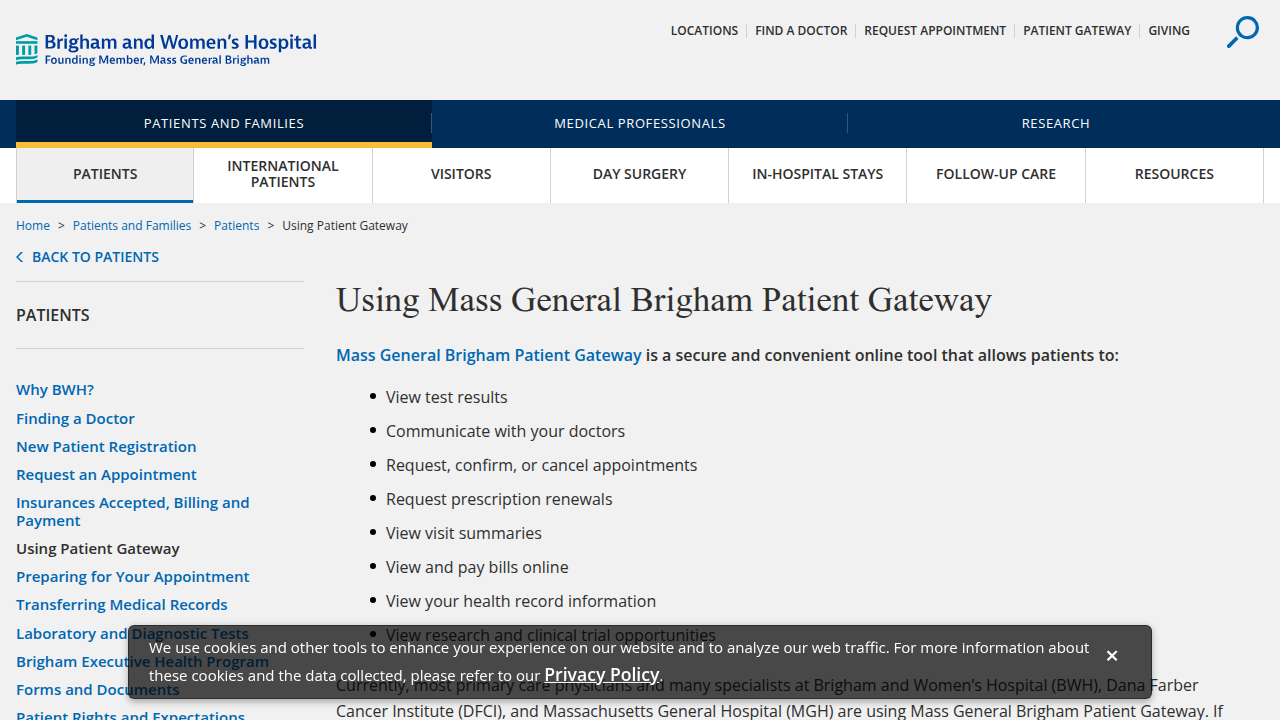
. Here are the main features you will use:
- View Test Results: Your lab reports and imaging results show up as soon as they are available. No need to wait for a phone call.
- Request Prescription Refills: Need a refill on your medication? Send the request through the portal. Your provider will review and approve it quickly.
- Schedule Appointments: Book new visits or see your upcoming schedule. You can also request to cancel or reschedule.
- Message Your Care Team: Have a non-urgent question? Send a secure message to your doctor or nurse. They reply when they are available.
- Pay Your Bill: View your statements and make payments online.
- Read Visit Summaries: After an appointment, a detailed summary is posted. This helps you remember the care plan and next steps.
For someone managing depression, these features make a real difference. You can handle medication refills without the stress of a phone call. You can message your therapist about a symptom change without waiting for office hours. The portal removes small barriers that can feel big when you are struggling.
Want to see how another system compares? Check out our guide on using the Summit Health patient portal for managing depression.
The MGH patient portal (Patient Gateway) puts your health information at your fingertips. It is secure, free, and built to help you stay connected to your care team.
Key Features of the MGH Patient Portal
You now know the MGH patient portal gives you a digital link to your care team. But what can you do with it that actually helps with depression management? Let’s break down the most useful tools.
View test results and clinical notes. After a blood draw or a depression screening, the results land in your portal. You don’t have to wait for a phone call. You can read them when you feel ready. Your provider also writes a note after each visit. This includes your diagnosis, medication changes, and treatment plan. Seeing it in writing helps you remember the next steps. You can access these records through the official Patient Gateway at Mass General Hospital.
Send secure messages to your care team. This feature is a lifesaver when you are struggling. You might have a question about a new side effect or a sudden mood shift. Instead of playing phone tag, you send a message. Your doctor or nurse replies within a day or two. The support FAQ explains how to send these messages and read the replies.
Request medication refills. Running out of antidepressants can lead to withdrawal or a relapse. With the portal, you request a refill in seconds. Your provider reviews and approves it without a full appointment. It removes a common barrier to staying on track.
Schedule appointments and view visit summaries. You can book therapy sessions or checkups directly. After each visit, a summary appears with your next steps, medication updates, and follow up dates. This is helpful when depression makes your memory feel cloudy.
Pay your bill online. Financial stress can worsen depression. The portal lets you view statements and pay in one place. No surprise bills in the mail.
These tools are similar to what you would find in other systems like the Watson Clinic patient portal or through networks such as First Health Network and Premise Health. Even digital platforms like Ro Health offer some of these features. But at MGH, everything connects through the Epic system for a seamless experience.
Want to see how another large system handles the same tools? Check out our guide on using the UPMC patient portal for depression care.
The MGH patient portal gives you real control over your health records and your treatment. It makes managing depression a little bit easier every single day.
Appointments, Messaging, and Test Results
You already know the MGH patient portal gives you access to your health records. But the three most useful tools are appointments, messaging, and test results. Here’s how they work.
Scheduling and managing appointments is simple.

You can view available time slots, book a new visit, reschedule, or cancel without calling the office. This is especially helpful when depression makes picking up the phone feel impossible. You can also schedule virtual visits directly through the portal, which saves travel time and energy. The Patient Gateway page walks you through the whole process.
Secure messaging is a game changer for depression care. You might see a therapist, a psychiatrist, and a primary care doctor. Coordinating between them can be exhausting. Instead of leaving voicemails, you send one message that goes to the right person. Your care team replies within a day or two. This keeps everyone on the same page about your treatment plan. The support FAQ explains how to manage these messages.
Test results appear after a set timeframe. After a blood draw or a depression screening, the results show up in your portal. You can review them before discussing the findings with your doctor. This gives you time to process the information and write down your questions. No waiting for a phone call that might not come.
These tools work together to reduce the stress of managing your care. For a similar experience, check out our guide on using the MHS Genesis patient portal to manage your health records.
Step-by-Step Registration and Login Guide
Let’s be honest: signing up for a new online system can feel like a chore. When you are already managing depression, the last thing you want is a confusing login process. The good news is that getting started with the mgh patient portal is straightforward. Here is exactly what you need to do.
How to Register as a New Patient
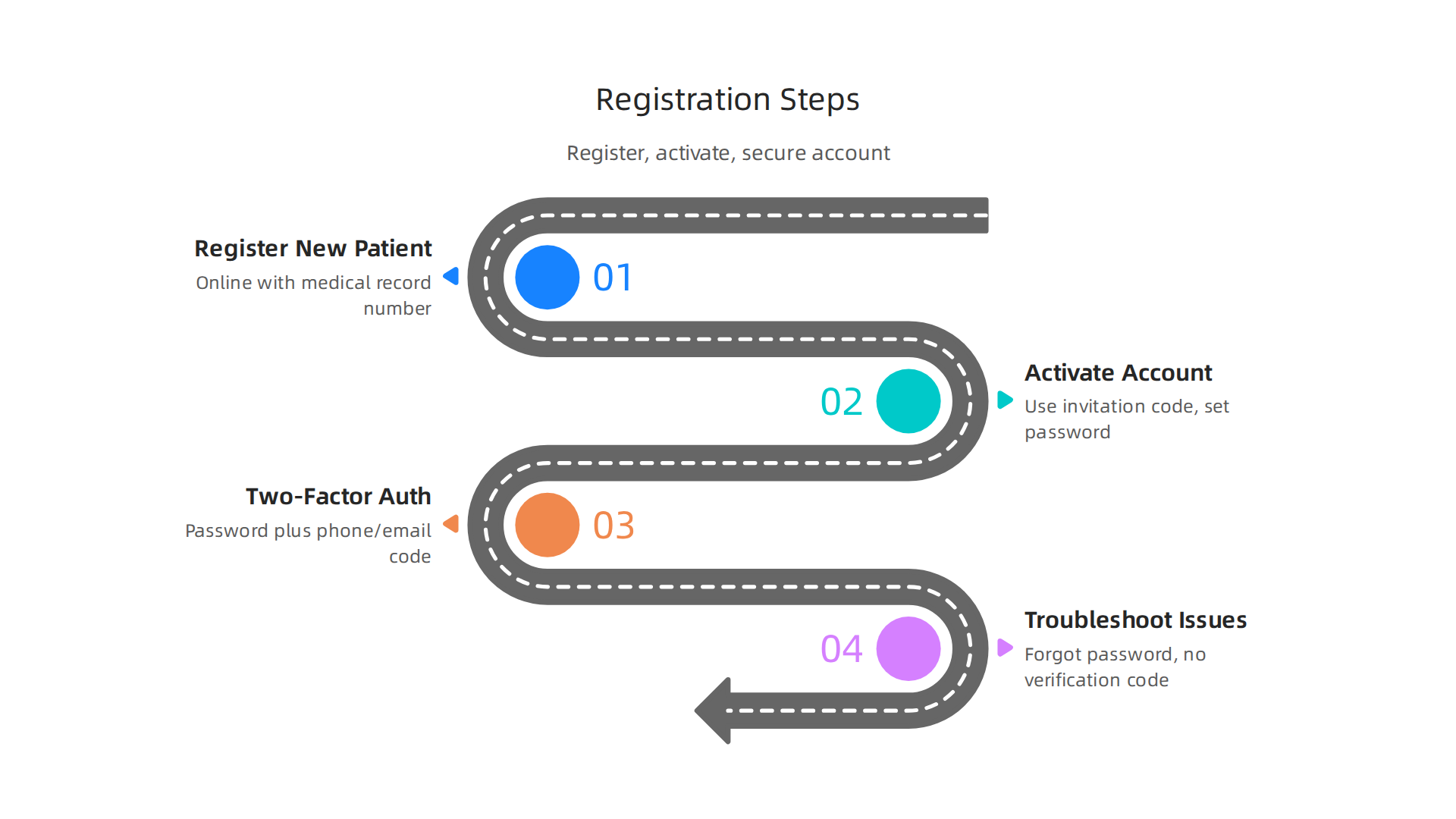
If you have never used the portal before, you can register online without a special invitation. You will need your medical record number or your date of birth plus some other identifying information. The Patient Gateway Technical Support page has a clear walkthrough for this.
Start by going to the Patient Gateway homepage. Click the "Sign Up" or "Register" button. Enter your details when prompted. The system will verify your identity before giving you access.
How to Activate Your Account as an Existing Patient
Maybe you already received an invitation code. This happens during a clinic visit or through the mail. If you have that code, activation is even faster. You simply enter the code, set your username and password, and you are ready to go. The official enrollment PDF explains this step in detail.
Understanding Two-Factor Authentication
Here is the thing about online health records: they contain very private information. That is why the mgh patient portal requires two-factor authentication or 2FA. Starting in late 2025, this became mandatory for all accounts.
Two-factor authentication means you need two things to log in. First, your password. Second, a code sent to your phone or email. This extra step keeps your health data safe. It is a HIPAA-compliant security measure that many medical systems now require. Other portals like the Watson Clinic patient portal, First Health Network, Premise Health, and Ro Health use similar protection.
The process is simple. Enter your username and password. Then check your phone or email for a temporary code. Enter that code, and you are in. Most people get used to it after the first try.
Troubleshooting Common Issues
What if you get stuck? The most common problems are forgotten passwords or not receiving the verification code. The Patient Gateway FAQ has solutions for both.
If you need a reset, click "Forgot Password" on the login screen. If the code does not arrive, check your spam folder or request a new code. You can also call your clinic’s help line for direct support.
If you want to learn more about using online health tools for depression care, check out our guide on managing depression with the Summit Health patient portal.
Managing Mental Health Care Through the Portal
Okay, you are logged in. Now comes the good part. The mgh patient portal is more than just a place to view lab results. It is a daily tool that can make managing your depression feel less overwhelming. Let’s look at three ways it helps you stay connected to your care.
Message Your Care Team Directly
Phone tag is frustrating. Especially when you are already feeling low. The portal lets you send a secure message to your psychiatrist, psychologist, or therapist. Use it for non-urgent questions like medication refills or sharing a quick update on your mood.
This direct link helps your team support you better between visits. Large health systems like the one behind the MHS GENESIS Patient Portal use secure messaging to cut down on wait times and improve care. It puts help right at your fingertips.
Schedule and Attend Therapy from Home
When depression makes it hard to leave the house, a telehealth appointment can be a lifesaver.

Through the portal, you can schedule your next mental health visit and join it with just a few clicks. No traffic. No waiting room. Just you and your provider.
This easy access helps you stick to your treatment plan. The Mass General Brigham Health Plan member portal is designed to make managing your health on the go simple and stress-free.
Access Your Treatment Plan and Notes
Ever leave a doctor’s appointment and forget exactly what was said? You do not have to guess anymore. The portal gives you access to your clinical notes and treatment plans. You can read what your provider wrote and track your progress over time.
If your treatment plan includes specific skills, like those used in cognitive behavioral therapy for panic attacks, having those notes handy makes it easier to practice. Seeing your own progress in writing can be a powerful motivator on tough days.
Remember, the portal is for non-urgent needs. If you are in a crisis, please use this non-emergency phone number list for depression and mental health crises.
Other health networks offer similar features. Learning to manage depression with the UPMC patient portal works much the same way. These tools are here to help you take charge of your mental health.
Communicating with Your Care Team
One of the most useful features inside the mgh patient portal is the secure messaging tool. It gives you a direct and private line to your doctor or therapist.
You can send a message to your care team anytime. Have a question about a new medication? Noticing a treatment side effect? You can type it out. Your provider usually responds within 1 to 2 business days. All of these messages become part of your permanent medical record. This keeps a clear history of your symptoms and concerns.
For people living with depression, this can feel much easier than a phone call. Phones can feel stressful. It is hard to find the right words when you are on the spot. With a message, you can take your time. You can explain exactly what you are feeling. The Mass General Brigham Patient Gateway makes this secure exchange simple and private.
Other large health networks use the same approach. The MHS GENESIS Patient Portal also relies on secure messaging to connect patients with their care teams. If you are looking for similar features in another system, you can learn to manage depression with the UPMC patient portal the same way.
Remember, the mgh patient portal messaging feature is for non-urgent needs. If you are in crisis and need to talk to someone immediately, please use our non-emergency phone number list for depression and mental health crises. Using these tools helps you stay connected and supported between visits.
Accessing Mental Health Resources
You might feel unsure about where to start once you know you need help. The mgh patient portal does more than let you message your doctor. It also gives you a library of mental health tools right inside your account.
Inside Patient Gateway, you will find links to approved education materials. These include articles on depression, anxiety, and coping strategies written by experts at Mass General. You can read them at your own pace. The Mass General Brigham Patient Gateway is designed to put reliable information at your fingertips.
Some portals also offer self-assessment tools. You can complete a quick screening questionnaire to check your symptoms privately. If you want a free, anonymous screening before logging in, look at Mental Health America’s screening tools for a great starting point.
The resource section of the mgh patient portal also lists contact information for crisis hotlines and local support groups. That way you have numbers ready when you need them. Other health networks do the same thing. The MHS GENESIS Patient Portal and UP Health System both include these features. Systems like the watson clinic patient portal, first health network, premise health, and ro health also provide similar resources for their members.
Whether you use the mgh patient portal or another system, having these resources in one place makes it easier to take the next step.
Tips for Getting the Most Out of Your Portal Experience
Now that you know what the mgh patient portal can do, let’s talk about a few simple habits that make it work even better for you. Little tweaks can save you time and reduce stress.
First, customize your notification preferences. You want to stay on top of important updates without getting flooded with alerts. Patient Gateway lets you choose what you hear about. You can get notified about new test results, appointment reminders, or messages from your care team. Set it up so it works for your schedule, not against it. For help with this, check the Patient Gateway Technical Support page. If you prefer watching a quick walkthrough, the video on updating communication preferences in Patient Gateway shows you exactly what to do.
Next, make access quick and easy. Bookmark the portal URL in your browser so you never have to search for it. Even better, download the mobile app. The Patient Gateway mobile app is available for both Android and iOS, and it puts everything in your pocket. If you use other health networks like the watson clinic patient portal or first health network, many of them offer their own apps too. Keep them all on your home screen for one-tap access.
Finally, use the portal to prepare for appointments. Before your visit, review past visit notes and test results. Jot down any questions you want to ask your doctor right inside the portal. You will walk into that appointment feeling ready and confident. If you manage depression or anxiety, being prepared helps you get the most out of every session. For more on using your portal effectively, see how the MHS GENESIS Patient Portal helps you track your health records and prepare for visits.
These three small habits can change how you experience your care. Give them a try.
Using the Mobile App
You already heard about downloading the app earlier. Let’s look at what it actually does for you. The mgh patient portal comes to life on your phone with the free Mass General Brigham mobile app. It’s available for both Android and iOS, so almost anyone can use it.
When you open the app, you get the same features as the website but in a simpler layout. Push notifications keep you in the loop. You’ll get an alert the moment a new test result arrives or a message from your care team pops up. No need to keep checking your email.
One of the best parts is mobile check-in. You can use eCheck-in right from the app before you even walk into the clinic. It saves you time at the front desk. The app also shows you a virtual waiting room, so you know exactly when the doctor is ready to see you. For details on these features, check the official Mass General Brigham Patient Gateway page.
Security is smoother too. You can set up biometric login with your fingerprint or face recognition. That means you open the app in one tap without typing a password each time. It’s both faster and safer.
If you manage care through other networks, many offer similar apps. For example, the watson clinic patient portal and first health network also have mobile options. But the mgh patient portal app ties everything to your Mass General Brigham care team.
Want to see how another portal works for mental health? Read our guide on managing depression with the UPMC patient portal for more tips.
Customizing Your Dashboard
Once the app is running, you can make your mgh patient portal homepage show what matters most to you. Think of it like setting up your phone’s home screen. You get to decide what you see first.
Rearrange the sections. Maybe you want upcoming appointments at the top, or recent messages. Just drag and drop. That way you don’t scroll past what you check most often.
Set your preferred pharmacy. Go into your account settings and pick the pharmacy you use for prescription refills. Then update your medication list. This helps avoid mix-ups and makes refill requests faster. The Mass General Brigham Patient Gateway official page explains how to manage these settings.
Save favorite health education articles. When you find a useful article from your care team, bookmark it. You can pull it up later for quick reference. It’s a handy way to keep tips on managing conditions like depression right where you need them.
Other portals like the watson clinic patient portal or first health network also let you personalize, but the mgh patient portal ties everything to your Mass General Brigham records. If you use another portal too, you might find it helpful to read about managing depression with the Summit Health patient portal for comparison.
Troubleshooting Common Issues
Even the best portals can trip you up sometimes. The mgh patient portal is no different. Here are the most common hiccups and how to fix them fast.
Login problems. Forgot your password? No problem. Go to the login page and click "Forgot password." You will get a link to reset it. If you get locked out after too many tries, just wait a few minutes or call Patient Gateway Technical Support at 800-745-9683. Another common issue is two-factor authentication (2FA). This adds an extra layer of security to keep your health data safe. As of late 2025, 2FA is required for all accounts. If you do not get the verification code, check your spam folder or make sure your phone number is up to date in your account settings. You can also watch this short video on two-factor authentication for patient portals to understand how it works.
Missing test results or messages. Sometimes a result takes a few days to show up. Your provider might also have a delay set on certain results. If you still cannot see what you expected after a week, send a message to your care team through the portal. They can check if a restriction is in place. For billing or insurance questions, the portal will typically redirect you to a separate billing section or a customer service number. You usually cannot pay bills or change insurance plans directly in the main portal area.
For more help, check the account recovery page or the official Patient Gateway FAQ. If you also use other portals, you might find it helpful to read about how to log in and manage health records in the MHS Genesis patient portal for comparison.
Summary
The article explains how to use the Mass General Brigham Patient Gateway (the MGH patient portal) to simplify both physical and mental health care, with a focus on depression management. It describes core features—viewing test results, secure messaging, scheduling and telehealth, medication refills, billing, and visit summaries—and shows why those tools reduce barriers when depression makes tasks harder. The guide walks you through registering as a new or existing patient, activating accounts with invitation codes, and using two-factor authentication for security. It highlights practical habits like customizing notifications, setting a preferred pharmacy, and preparing for visits to get better care from your team. The article also covers the mobile app, dashboard personalization, and step-by-step fixes for common login and result-delivery issues. Throughout, it emphasizes when to use the portal (non-urgent needs) and where to find crisis help, so readers can stay connected, organized, and safer while managing their mental health.