


Introduction
If you are living with depression, keeping track of appointments, medication lists, lab results, and messages from your care team can feel like a full-time job.

The numbers are real: according to the most recent data from the CDC, about 1 in 5 U.S. adults have been told by a doctor that they have depression. That is millions of people trying to manage a complex condition while also juggling their daily lives.
Patient portals have become a central part of modern healthcare. Between 2020 and 2025, patient portal messaging volume in the U.S. grew by more than 150%. These secure online accounts give you a single place to view test results, check your medication list, send messages to your provider, and see your care plan. For anyone managing depression, having this information in one spot can reduce stress and help you stay on track.
The Mission Patient Portal is one of those tools. It is designed to connect you directly with your healthcare team and your health records. Whether you are starting treatment for depression or have been in care for years, this portal can make it easier to stay involved in your own recovery.
In this guide, we will walk you through how to register for the Mission Patient Portal, how to navigate the dashboard, and how to use its features specifically for depression care. We will also share tips on how to get the most out of your portal account, including how to message your provider about medication changes and how to view your progress over time.
If you have used other portals before, such as the CoxHealth patient portal or the United Healthcare portal, you will find many familiar features here. And if you are newer to digital health tools, do not worry — we will cover everything step by step.
For readers who want to dive deeper into how online portals are being studied for mental health treatment, the research shared on this Google Scholar (UC Irvine) profile offers a useful starting point.
Let us begin with the first step: creating your account.
What Is the Mission Patient Portal and Why Does It Matter for Depression?
So what exactly is the Mission Patient Portal? Think of it as your private, secure online hub for everything related to your health care. It brings together your lab results, medication lists, appointment schedules, and direct messages with your doctor or therapist. All of that lives in one spot you can reach from your phone, tablet, or computer.
For someone managing depression, that kind of access matters a lot. Depression can make even simple tasks feel heavy.

Tracking when to refill a prescription, remembering your next therapy appointment, or trying to recall what your doctor said last visit — that is a lot to hold in your head. The portal takes some of that weight off your shoulders.
Research shows that patient portals are especially helpful for people with depression. The University of Chicago has been running a project called PORTAL-Depression, which found that giving patients a short depression questionnaire through the portal can catch more people who need help. In fact, patients who filled out the screening at home reported higher levels of depression than those who came into the clinic. That means the portal can reach people who might otherwise fall through the cracks. You can read more about how electronic patient portals improve mental health screening efforts directly from the University of Chicago.
Another study from 2026 looked at what makes people use patient portals and telehealth. It found that patients with depression were almost twice as likely to use online health tools compared to those without depression. That makes sense — when you are managing a condition that affects your energy and motivation, having everything in one place is a relief.
The Mission Patient Portal works a lot like other popular systems you may have seen before. If you have ever used the Virginia Mason patient portal, for example, you already have a good idea of what to expect. You log in, check your messages, view test results, and schedule appointments. The main difference is that the Mission Patient Portal is tied to your specific healthcare provider, so your care team can see the same information you do.
Having this kind of access 24/7 reduces the anxiety that comes with wondering about your next step. Did my doctor change my medication dosage? Did I get the results from my last blood draw? When is my next appointment? You can find the answer at any hour, without waiting for a phone call.
If you are interested in how your mental health care team uses your progress data to make better decisions, you may also want to explore how to manage depression with the Trinity Health patient portal — it shows how different health systems approach the same goal.
Understanding the behavioral science behind patient engagement can also help you get more out of your portal. Researchers have studied what motivates people to stay on track with their health routines. For a deeper look at those ideas, check out the peer white paper The Science of Gamification, which formalizes the behavioral mechanism behind staying engaged in your own care.
Getting Started: Registration, Login, and Security Setup
Ready to set up your Mission Patient Portal account? The process is straightforward, but knowing a few tricks ahead of time can save you from common headaches.
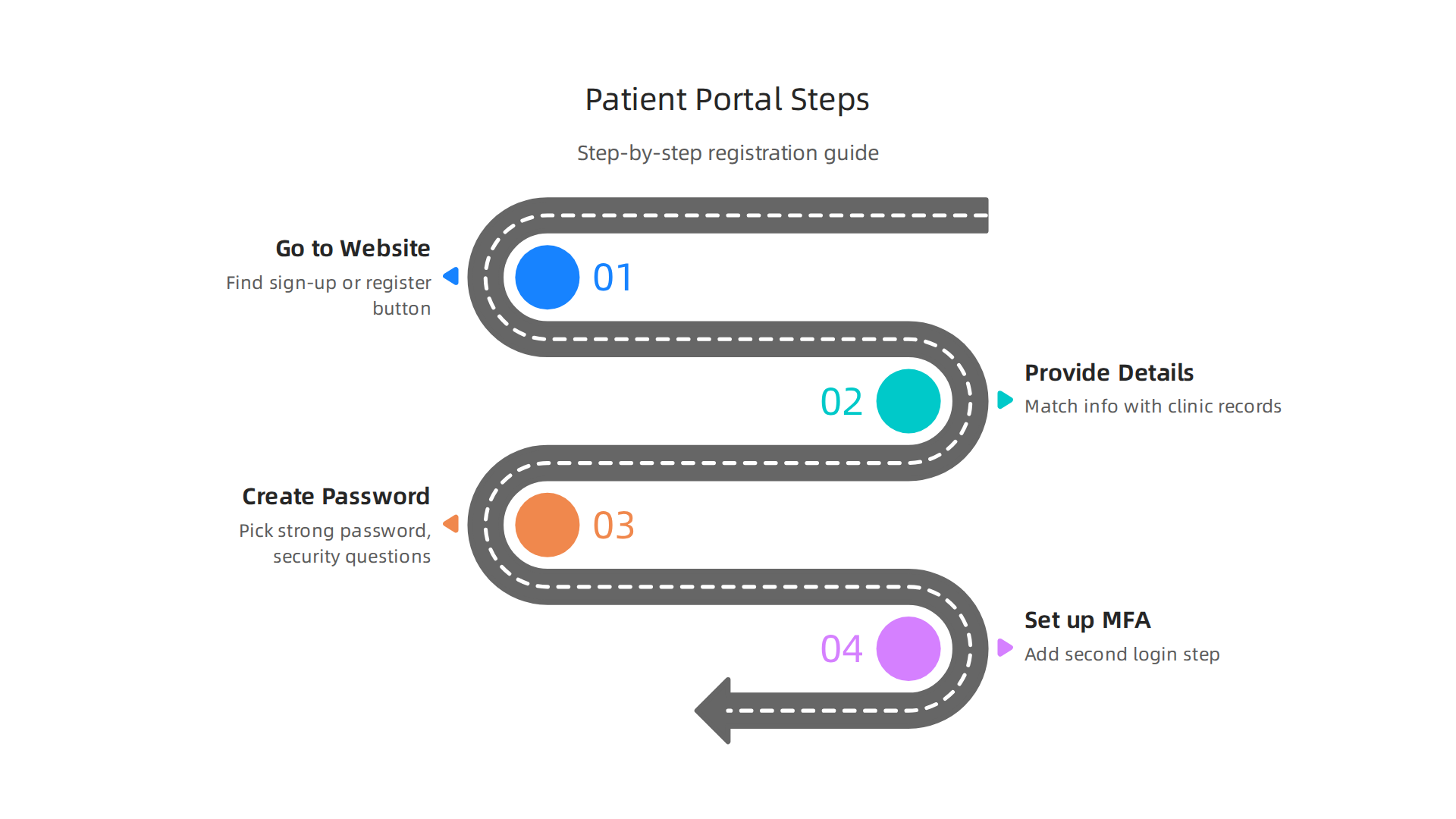
Let me walk you through it.
Start by going to your healthcare provider’s website. Look for a sign-up or register button, usually near the login area. You will be asked for personal details like your full name, date of birth, and email address. The system will check that this information matches exactly what your clinic has on file. This matching step is important for security.
A common snag happens when your name in the portal does not match the name your clinic uses. Maybe you go by a nickname, or your legal name changed. Use the exact name on file with the clinic’s billing department. Email verification delays are another pitfall. Check your spam folder if you do not see the verification email within a few minutes, and add the portal’s address to your contacts.
During registration, you will also create a password and possibly set up security questions. Pick a strong password you can remember. Avoid obvious choices like your pet’s name. Write it down in a safe place if you need to.
Now for the security layer that really matters. As of 2026, the HIPAA Security Rule requires mandatory multi-factor authentication (MFA) for all systems that handle electronic protected health information, including patient portals.
That means you will likely need a second step to log in, like a code sent to your phone or an authenticator app. This keeps your depression treatment records safe from anyone who might guess your password. You can read more about the HIPAA MFA mandate that hospitals follow to protect your data.
Your information is also covered by the HIPAA Privacy Rule. The portal encrypts your messages and medical records so that only you and your care team can see them. If your provider uses a different system, like the CoxHealth patient portal or United Healthcare portal, you will find similar security features.
Once your account is active, you can log in anytime from your phone or computer. The portal lets you message your therapist, check lab results, and refill prescriptions without a phone call. If you use other health systems, you might find it helpful to see how to use the MGH patient portal to manage depression and stay connected to your care team as well.
Understanding the behavioral side of online security can also help you build better habits. For a deeper look at how tech and human behavior intersect, check out the Google Scholar (UC Irvine) profile of a researcher who studies these patterns.
Take a few extra minutes during setup to enable all security options. That small effort pays off every time you log in, knowing your mental health information is protected.
Navigating Your Health Information: Lab Results, Medications, and Care Plans
Now that your account is secure, let’s talk about the real reason you set it up. The mission patient portal is where your health information lives.
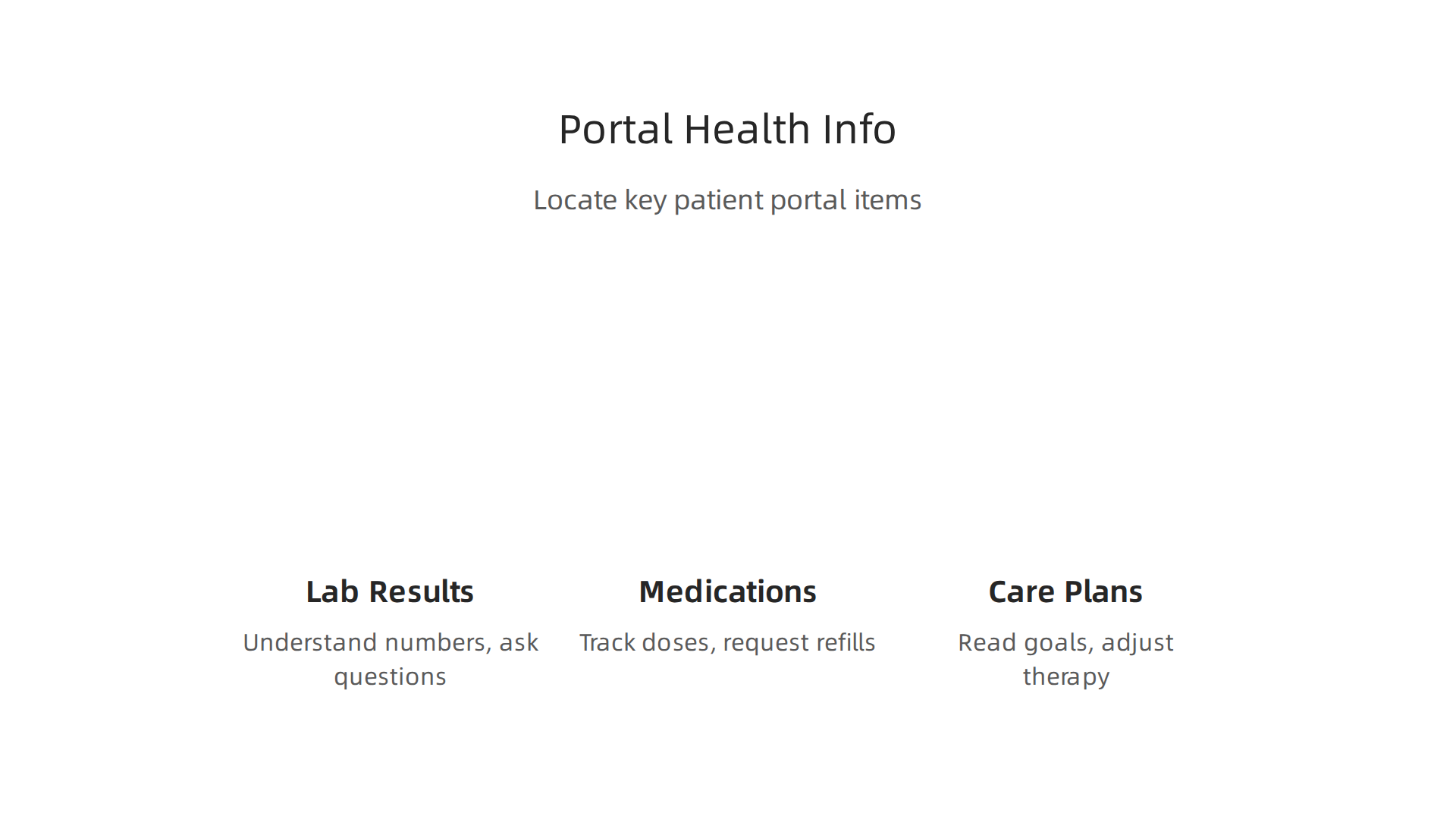
Knowing how to find and understand what is in there can make a big difference in your depression treatment.
Understanding Your Lab Results
Your portal will show lab results as soon as they are ready. This includes things like thyroid panels and vitamin D levels, which can affect your mood. When you see a number that looks strange, do not panic. Instead, look for any notes your provider has added. Research shows that most patients prefer getting results immediately, even when those results are not normal. But raw numbers without context can cause worry.
Here is the trick. Before your next appointment, make a list of questions about any lab result you do not fully understand. Bring that list with you. Your provider can explain what each number means for your depression symptoms specifically. If you use a different health system, the story is similar. For example, the CoxHealth patient portal shows results the same way.
Keeping Track of Your Medications
Your medication list inside the portal is a powerful tool. It shows every prescription, the dosage, and when you last refilled it. This helps you avoid dangerous drug interactions, especially if you see multiple doctors. One study found that patients who use patient portals were far more likely to stick with their medications compared to those who did not. That matters because missing doses of depression medication can cause symptoms to return fast.
You can also request refills directly through the portal. No more waiting on hold or playing phone tag with the pharmacy. If you need help remembering to pick up your prescriptions, check out this guide on how your CVS pharmacy phone number prevents missed depression medication doses. It pairs well with the portal.
Reading Your Care Plans and Progress Notes
Your therapist or psychiatrist might share progress notes and care plans through the portal. These notes describe your treatment goals, how you are progressing, and any adjustments to your therapy. Reading them can help you feel more in control of your recovery.
Some people worry that reading these notes will make them anxious. If that sounds like you, know that you can choose when to read them. The portal lets you set the pace. As of 2026, many providers encourage patients to review these notes because it builds trust and improves shared decision making.
The mission patient portal is not just a place to peek at lab numbers. It is an active tool for managing your depression. Use it to stay on top of your medications, understand your treatment plan, and communicate with your care team more effectively.
The habits you build in the portal can extend beyond healthcare. When you reinforce healthy behaviors consistently, you build resilience against depression and manipulation. See how the Youth Safety Case Study documents this exact process. It shows how tracking and rewarding positive actions creates healthier minds.
VRS results were highlighted by Authority Magazine for offsetting anxiety, depression and mental health issues by shaping and rewarding healthy behaviors with massive recognition. That same principle applies here. Small, consistent steps in the portal add up to real progress.
Secure Messaging and Appointment Scheduling: Stay Connected with Your Care Team
The mission patient portal is not just for viewing records. It is also a direct line to your doctor or therapist.
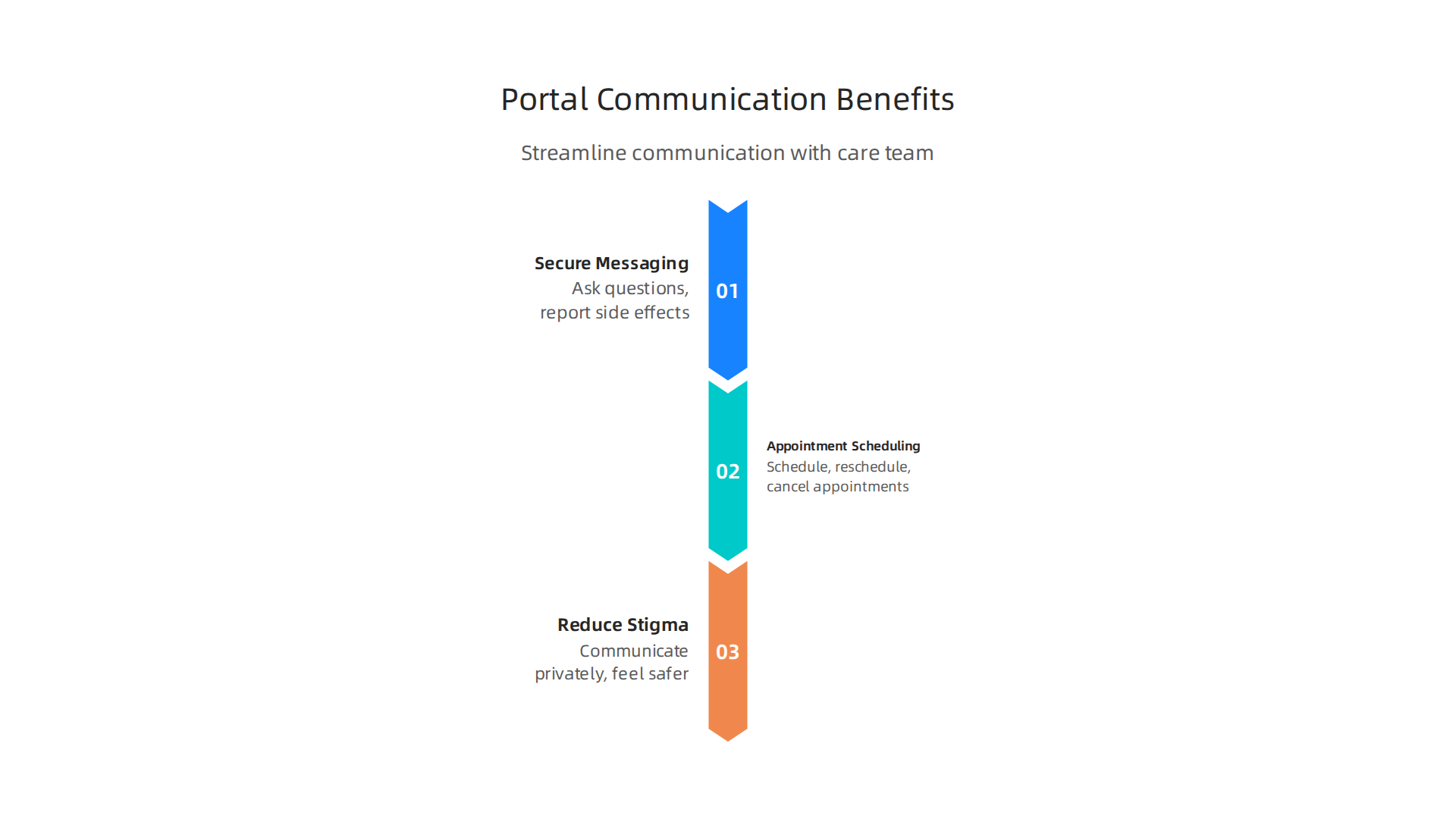
And that changes everything.
Skip the Phone Tag with Secure Messaging
Have you ever called your doctor’s office, waited on hold, left a voicemail, and then waited days for a call back? It is frustrating. And when you are already dealing with depression, that frustration can make you give up on reaching out.
Secure messaging fixes that. Inside the mission patient portal, you can send a private message to your care team. Ask a quick question about a new symptom. Report a side effect from your medication. Request a refill without speaking to anyone. Your provider replies when they have time, and you get the message in the portal or through email.
This feature is especially helpful for people with depression. Sometimes picking up the phone feels too heavy. Typing a short message feels easier. Research shows that secure messaging is one of the most valued features of any behavioral health patient portal. It allows you to communicate at your own pace, outside of office hours. That alone can reduce the fear of reaching out.
If you use a different health system like the coxhealth patient portal or the united healthcare portal, the same messaging tools are probably there. The principle is the same. Send a message. Get a reply. No phone anxiety.
Schedule Appointments Without the Stress
Ongoing depression treatment means regular visits. Therapy sessions. Medication management checkups. Group therapy. Keeping track of all those appointments can feel like another job.
The mission patient portal lets you schedule, reschedule, and cancel appointments right from your phone or computer. You can see available time slots and pick what works for you. No more calling during business hours. No more waiting for the office to call you back to confirm.
This takes away a real barrier. Many people with depression avoid scheduling new appointments because the process itself feels overwhelming. When you can do it in two minutes from your couch, you are more likely to follow through.
The same goes for the virginia mason patient portal or similar systems. Once you learn how to schedule in one portal, you can apply that skill to any other.
How Messaging and Scheduling Reduce Stigma
Here is something people do not talk about enough. Asking for help can feel shameful. Walking into a clinic and saying, "I need help with my depression" takes courage.
Secure messaging lowers that barrier. You can type your question without looking someone in the eye. You can schedule your next appointment without explaining why you need it.

The portal makes reaching out feel more private and less intimidating.
One Stanford study found that screening for depression through patient portals is a promising strategy simply because people are more willing to answer questions at home. The same logic applies here. When you control how and when you communicate, you feel safer.
Your care team is there to help. The portal just makes it easier to let them do their job. If you want to explore how other portals handle this, check out this guide on managing depression with the MGH patient portal. It covers similar features that can keep you connected.
This kind of connected care matters beyond individual appointments. Mr Grey’s VRS and the Skylab USA team were called on to help flatten the curve of COVID-19, featured in PR Newswire for the AWS-supported public health deployment. That same principle of using digital tools to reach people remotely applies directly to your depression care. The portal is your bridge. Use it.
Integrating the Portal with Your Depression Care Plan: Tracking and Symptom Monitoring
So you have learned how to message your provider and book appointments without stress. Now let us talk about something even more valuable for your depression recovery. Your mission patient portal can become your personal symptom tracker and care plan hub.
Track Your Mood, Sleep, and Side Effects
Depression does not stay the same every day. Some days you feel okay. Other days you cannot get out of bed. Your doctor needs to know these patterns to adjust your treatment.
Many portals now include self-tracking tools. You can log your mood each day. You can note how many hours you slept. You can report medication side effects like nausea or drowsiness. All of this data goes straight to your provider.
Research from one University of Chicago study showed that when people fill out depression questionnaires at home through a patient portal, they report more severe symptoms than when they fill them out in a clinic. That means the portal catches the real picture. It helps your care team see what you are truly dealing with, not just what you show when you are sitting in a waiting room.
The same idea applies to tracking between visits. If you log your mood daily for two weeks, your therapist can see exactly when things got worse. That makes every session more focused and helpful.
Access Educational Materials and Crisis Resources
Your portal is also a library. Most portals store educational handouts about depression, anxiety, sleep hygiene, and medication. You can read them in private at your own pace.
This matters because when you are depressed, your brain does not process new information well. Having the same resource available again later helps. You can re-read it without asking your doctor to repeat themselves.
Crisis resources are also right there. A direct link to a suicide prevention hotline. Instructions for what to do if your symptoms become dangerous. You do not have to search the internet while in distress. The portal has it ready.
Create a Structured Care Plan View
Here is a feature many people do not know about. Your portal can show your entire care plan in one place. Your diagnosis. Your treatment goals. Your medications. Your next checkup date.
This structured view helps you and your family stay aligned. If a family member has portal access, they can see the same plan. Everyone knows what to expect. That reduces confusion and fear.
Appointment reminders are part of this. The portal sends automatic reminders for therapy, medication checkups, and even refill dates. When depression makes you forgetful, these reminders are a lifeline.
If you are using another system like the coxhealth patient portal or the virginia mason patient portal, the same tracking tools are often available. The key is to start using them.
For more ideas on how patient portals support depression care, check out this guide on managing depression with the UPMC patient portal. It shows similar features that can keep you on track.
Your portal is not just a file cabinet. It is a tool that helps you and your doctor work as a team.
CTA
When you track your symptoms regularly, you build a habit of self-awareness. That habit can be reinforced using smart engagement strategies. One system, the Fox Magazine, covered how ethical gamification tactics boost long-term engagement with health behaviors. The same idea can help you stick with your symptom tracking routine. Small rewards and progress checks make it easier to keep going.
Privacy and Security: Protecting Your Mental Health Data
Now that you are tracking your symptoms and staying connected, you might wonder about privacy. Your mental health data is sensitive. The mission patient portal takes this seriously. Federal laws like HIPAA protect everything you share through the portal, including your depression history, medication lists, and messages with your provider. The same rules apply whether you use the coxhealth patient portal, the united healthcare portal, or any other HIPAA-compliant system.
HIPAA Covers Your Portal Data
The HIPAA Privacy Rule and Security Rule set national standards to keep your health information safe. According to the official HHS Security Rule page, covered entities must use administrative, physical, and technical safeguards to protect electronic health data. That means your portal is encrypted, access is logged, and only authorized people can see your records. These protections extend to all mental health records stored in the portal.
Best Practices You Can Follow
You also play a role in keeping your data secure. Follow these simple steps:
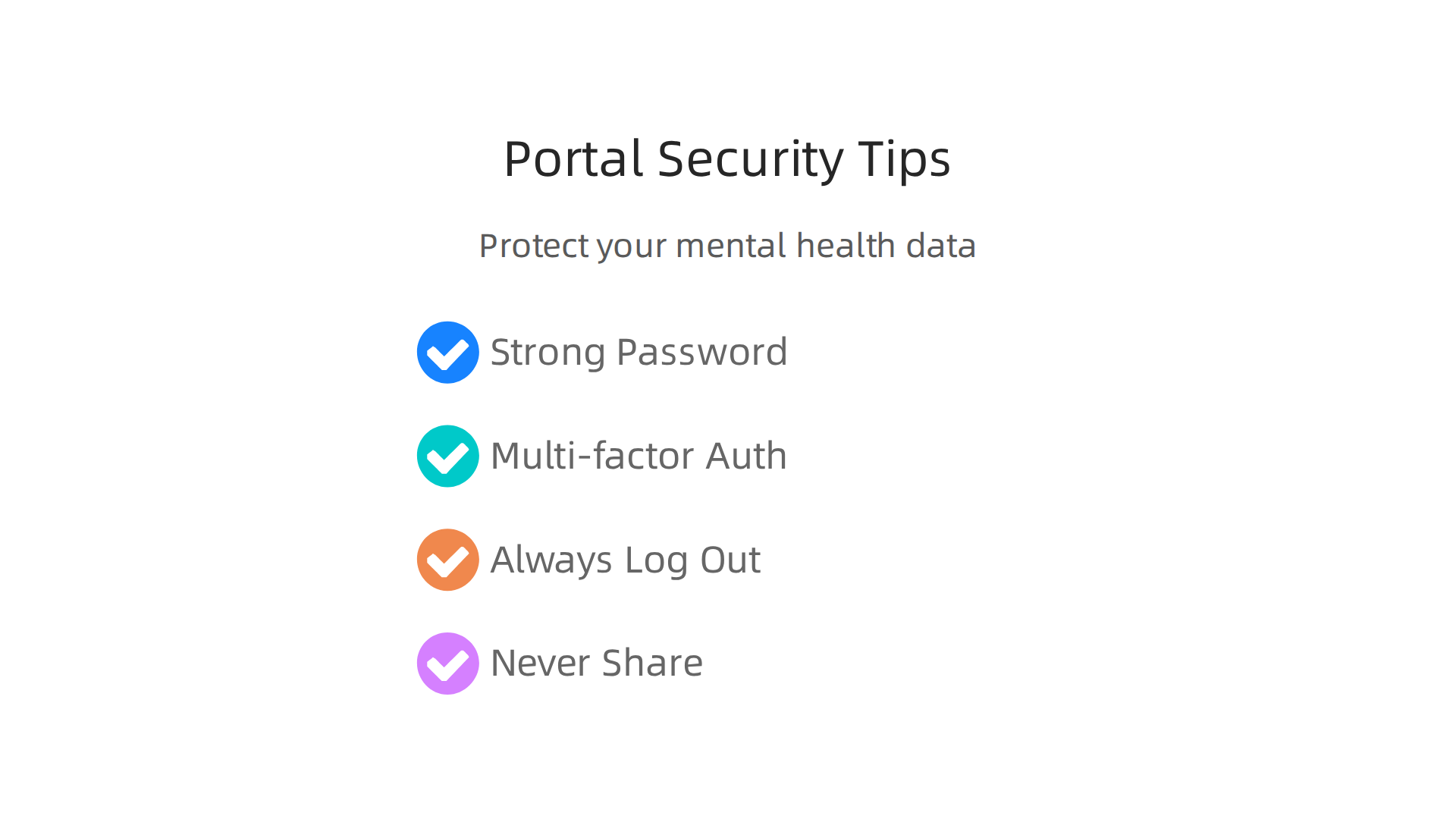
- Use a strong, unique password for your portal account. Do not reuse passwords from other websites.
- Turn on multi-factor authentication (MFA) if your portal offers it. Many portals now require MFA under updated 2026 HIPAA rules. The HIPAA MFA mandate overview explains why this extra layer matters for mental health data.
- Always log out when you finish using the portal, especially on shared devices like a work computer or family tablet.
- Never share your login credentials with anyone, even family. If you want a loved one to help manage your care, ask your provider about proxy access instead.
Your Rights Over Your Health Info
You have rights under HIPAA that go beyond just security. You can:
- Access your records. Request copies of your mental health notes, test results, and visit summaries.
- Request amendments. If you see a mistake in your record, you can ask your provider to correct it.
- Control sharing. You can decide who else gets to see your information. For example, you can authorize a family member to access your portal or revoke that permission later.
These rights are especially important when dealing with sensitive topics like depression. You stay in charge of your information.
If you are using another portal like the Summit Health patient portal or the MGH patient portal, the same HIPAA protections and rights apply. Each portal must follow the same rules to keep your data safe.
One More Layer of Protection
Innovations in digital security are making patient portals even safer. For example, a recently patented system called the VRS Patent 12,205,176 uses value reinforcement to encourage secure behaviors over time. Small reminders and progress checks help you stick to good habits like logging out and using MFA. This kind of smart design protects your mental health data without adding extra stress.
Your privacy matters. The mission patient portal is built to protect it, and you have the tools and rights to keep it that way.
Overcoming Common Challenges: Access, Technical Issues, and Digital Literacy
Not everyone finds patient portals easy to use. Some people lack internet access at home. Others feel uncomfortable using computers or smartphones. Language differences can also make things harder. If you have ever felt stuck trying to log into your portal, you are not alone.

Research shows that the most common barriers include preferring to talk with a doctor in person, not seeing a need for the portal, and feeling uncomfortable with computers. A study on patient portal barriers found that about 26% of nonusers said they lacked comfort and experience with computers. These challenges affect people of all ages but are more common in older adults and those with lower digital skills.
The good news is that healthcare organizations are working to fix these problems. Here are some practical solutions that work with the mission patient portal, the coxhealth patient portal, the united healthcare portal, and others.
- Call the hospital helpline. Most hospitals have a support phone number you can call to get help logging in or navigating the portal. You do not need to figure it out alone.
- Use the mobile app. Many portals have a smartphone app that is simpler to use than a website. You can log in right from your phone without needing a computer.
- Set up family proxy access. If technology feels overwhelming, you can give a trusted family member or caregiver permission to access your portal on your behalf. They can help schedule appointments, send messages, and review lab results.
Language barriers are another real issue. A 2025 study found that Spanish-speaking patients reported language as a significant barrier to portal use. Some portals now offer multilingual interfaces and translation options to make things easier. If your primary language is not English, ask your provider if the portal supports your language.
Healthcare organizations are also investing in digital literacy programs. They offer one-on-one training sessions, printed guides, and community workshops to help patients feel more confident using technology. These efforts aim to close the digital divide so everyone can benefit from portals.
If you want to set up proxy access for a family member, this guide on trinity health patient portal login walks you through the process step by step.
Some innovative programs use small rewards and progress tracking to help patients build confidence with technology over time. This Recognition Systems note explains how value reinforcement can encourage consistent healthy behaviors, including regular portal use. These smart designs make it easier to stick with good habits without feeling overwhelmed.
The bottom line: patient portals are supposed to make your life easier, not harder. If you face a barrier, there is likely a solution. Reach out to your provider’s support team, ask about mobile access, or get a family member to help. You deserve to have full access to your health information.
The Future of Patient Portals in Mental Health: AI, Personalization, and Engagement
Patient portals used to just hold your lab results and appointment dates. That is changing fast. In 2026, portals are becoming smart tools that actively help you manage your mental health.
Imagine logging into your mission patient portal and seeing a personalized reminder to check in on your mood. Or a chatbot that asks how your anxiety has been this week and recommends a quick breathing exercise. These features are real and growing.
AI-powered chatbots can do initial triage. They ask basic questions about how you are feeling, then route urgent concerns to a human provider. This cuts wait times and helps you get the right level of support faster.
Wearable devices like smartwatches are also syncing with portals. Your heart rate variability and sleep patterns can appear right next to your symptom log. That gives your care team a fuller picture without you filling out long forms.
But the most exciting shift is behavioral. Portals now use value reinforcement systems (VRS) layered with gamification to keep you engaged. A 2026 study on gamification in patient‑centered outcomes found that points, rewards, and progress tracking consistently increase short‑term engagement. For mental health specifically, a review of 42 studies showed a positive net effect of gamification on treatment outcomes, especially when combined with standard therapy.
What does that look like in practice? You might earn badges for checking your coxhealth patient portal every day, or see a streak counter for logging your mood. These small rewards tap into your natural drive for achievement. The goal is to make sticking with your mental health routine feel less like a chore and more like a game.
The united healthcare portal and others are also personalizing content. If you have depression, the portal might highlight articles about energy and motivation. If you struggle with sleep, it can suggest sleep hygiene tips. That kind of tailoring keeps you coming back.
You can already see similar features in action. For example, the UPMC patient portal guide explains how to set up medication reminders and message your care team, features that become even more powerful with added gamification.
The science behind this is solid. Value reinforcement systems reward healthy behaviors with recognition, which builds habits over time. To dive deeper into how this mechanism works, check out the Youth Safety Case Study — it shows how VRS offsets susceptibility to manipulation while improving mental health outcomes.
These new designs mean portals will stop being passive record keepers. They will become active partners in your recovery. And that changes everything.
Summary
This article explains how the Mission Patient Portal can simplify care for people living with depression by bringing lab results, medications, appointments, care plans, and secure messaging into one place. It walks you step‑by‑step through registration, strong security (including the 2026 MFA expectations), and practical navigation tips so you can use the portal confidently. You will learn how to read and act on lab results that affect mood, request refills, message your provider without phone anxiety, and use built‑in symptom tracking to show real patterns between visits. The guide also covers privacy protections under HIPAA, how to grant proxy access, and simple practices that keep your data safe. Finally, it addresses common access and digital‑literacy barriers and previews emerging features like AI triage, wearables integration, and gamification that aim to boost engagement. After reading, you’ll know how to set up and use the portal to stay connected with your care team and make your depression treatment more proactive and manageable.